IT Specialist Roadmap
Step-by-Step Career Roadmap Guide to Get Job Ready
IT specialists keep organizations running by managing networks, systems, and technical infrastructure. With global IT services increasingly reliant on cloud and digital solutions, IT specialists are crucial to ensuring seamless operations and supporting innovation.
IT specialists keep organizations running by managing networks, systems, and technical infrastructure. With global IT se...
340,000+
$105,000

Top Industries
Hiring IT Specialists
72%
Job Satisfaction
What Does an IT Specialist Do and Why Do Businesses Need Them?
An IT specialist installs, maintains, and troubleshoots the hardware, software, and network systems that keep a business operational. They support end users, manage system security, coordinate with vendors, and make sure digital tools work reliably every day.
An IT specialist installs, maintains, and troubleshoots the hardware, software, and network systems that keep a business operational. They support end users, manage system security, coordinate with vendors, and make sure digital tools work reliably every day.

System Administration
Manage servers, networks, & OS across infrastructure
Technical Support
Diagnose and resolve hw/sw and connectivity issues
Security & Compliance
Enforce policies, monitor threats, & maintain security
Cross-Functional Collaboration
Partner with finance, HR, ops, & leadership on IT needs
Who Is This Career For?
You may be a fit for an IT specialist if you're a:

Recent Graduate or Career Changer
You have a background in CS and are ready to start diagnosing real-world technical problems.
Tech Support Professional
You want to move into broader system and infrastructure management responsibilities.
Self-Taught Tech Enthusiast
You have worked with hardware and networks and want a recognized professional IT career.



Salary Snapshot
Compensation* grows significantly as you progress through your IT specialist career.
$75,000 – $85,000
+8% Annually
IT Support Specialist
$85,000 – $105,000
+10% Annually
IT Specialist / Analyst
$105,000 – $130,000+
+13% Annually
Senior IT / Systems Engineer
IT Support Specialist
$75,000 – $85,000
IT Specialist / Analyst
$85,000 – $105,000
Senior IT / Systems Engineer
$105,000 – $130,000+
*All salary figures are based on data from Glassdoor (Mar 2026, 800+ submissions), BLS, and LinkedIn Jobs Report.
Step-By-Step IT Specialist Career Roadmap
A comprehensive guide to skills, responsibilities, and expectations at each career level.
Who This Is For
Recent graduates from CS or IT-related programs
Junior technicians with hands-on experience
Career changers who want to enter tech through IT support
Recent graduates from CS or IT-related programs
Junior technicians with hands-on experience
Career changers who want to enter tech through IT support
Role Outcomes
Set up and configure workstations, printers, and basic network devices
Troubleshoot hardware and software faults and respond to user helpdesk tickets
Learn to apply and follow IT security policies and compliance standards
Support team projects and gain exposure to server and cloud environments
Tool Stack



Technical Skills
Hardware Troubleshooting & Repair
OS Installation & Configuration
Network Basics (LAN, WAN, Wi-Fi)
User Account Management (AD)
Helpdesk Ticketing & SLAs
Hardware Troubleshooting & Repair
OS Installation & Configuration
Network Basics (LAN, WAN, Wi-Fi)
User Account Management (AD)
Helpdesk Ticketing & SLAs
+ 4 more skills
Soft Skills
Verbal Communication
Active Listening & Patience
Technical documentation
Time Management
Attention to Detail
Verbal Communication
Active Listening & Patience
Technical documentation
Time Management
Attention to Detail
Example Deliverables

IT Onboarding Playbook
Step-by-step guide for configuring new employee devices, accounts, and software access
Helpdesk Ticket Report
Weekly summary of support requests, resolution times, recurring issues, and recommendations
Network Inventory Document
Complete register of all devices, IP addresses, OS versions, and warranty status
KPIs
First-Call Resolution Rate
Ticket Response Time
System Uptime %
User Satisfaction Score
Asset Inventory Accuracy
SLA Compliance Rate
Interview Checkpoint
Walk us through how you would troubleshoot a user who cannot connect to the company network and has a deadline in one hour.
How do you handle a situation where a user insists their issue is urgent?
Expect: systematic diagnostic thinking, prioritization process, communication approach, escalation awareness
Recent graduates from CS or IT-related programs
Junior technicians with hands-on experience
Career changers who want to enter tech through IT support
Recent graduates from CS or IT-related programs
Junior technicians with hands-on experience
Career changers who want to enter tech through IT support
Set up and configure workstations, printers, and basic network devices
Troubleshoot hardware and software faults and respond to user helpdesk tickets
Learn to apply and follow IT security policies and compliance standards
Support team projects and gain exposure to server and cloud environments
Hardware Troubleshooting & Repair
OS Installation & Configuration
Network Basics (LAN, WAN, Wi-Fi)
User Account Management (AD)
Helpdesk Ticketing & SLAs
Hardware Troubleshooting & Repair
OS Installation & Configuration
Network Basics (LAN, WAN, Wi-Fi)
User Account Management (AD)
Helpdesk Ticketing & SLAs
+ 4 more skills
Verbal Communication
Active Listening & Patience
Technical documentation
Time Management
Attention to Detail
Verbal Communication
Active Listening & Patience
Technical documentation
Time Management
Attention to Detail
IT Onboarding Playbook
Step-by-step guide for configuring new employee devices, accounts, and software access
Helpdesk Ticket Report
Weekly summary of support requests, resolution times, recurring issues, and recommendations
Network Inventory Document
Complete register of all devices, IP addresses, OS versions, and warranty status
First-Call Resolution Rate
Ticket Response Time
System Uptime %
User Satisfaction Score
Asset Inventory Accuracy
SLA Compliance Rate
Walk us through how you would troubleshoot a user who cannot connect to the company network and has a deadline in one hour.
How do you handle a situation where a user insists their issue is urgent?
Expect: systematic diagnostic thinking, prioritization process, communication approach, escalation awareness











Key Things to Know
Start with CompTIA A+ for hardware and software fundamentals. Employers widely recognize it and build the foundation you need before moving into networking (Network+) or security (Security+). Once you pass A+, advancing your certification path becomes much more straightforward.
Many employers care more about certifications and practical skills than a formal degree. Bootcamp graduates and self-taught technicians can also get started as long as they show solid troubleshooting skills and a clear understanding of how IT systems work.
You should move into systems work when you are comfortable diagnosing root causes, not just resolving symptoms. This shift typically happens after a few years in a helpdesk or support role, once you can confidently manage infrastructure components and explain your decisions to others.
Scripting is very important today because IT environments are increasingly complex, and repetitive tasks must be automated. You do not need to be a full developer, but you should be comfortable with PowerShell or Bash to write and maintain scripts that consistently reduce manual workload.
Moving to a senior role is less about technical skills alone and more about strategic thinking, leadership, and organizational influence. Senior IT professionals shape infrastructure decisions, guide larger investments, and translate technical complexity into business language. To grow, develop a clear technology vision, take ownership of cross-team projects, and speak up in budget and strategy discussions.
Senior IT professionals are expected to understand how AI tools support IT operations, from predictive monitoring to automated patch management. They also guide teams on responsible AI adoption, covering data governance, access control, and maintaining system reliability without over-relying on automated decisions.
How to Get Started
IT Specialist Roadmap: From Complete Beginner to Job-Ready IT Specialist
1. IT Fundamentals and Hardware Mastery
Learn
IT Hardware & Components
Operating Systems (Windows, Linux)
Networking Basics (TCP/IP, DNS, DHCP)
CompTIA A+ Exam Prep
Practice & Deliver
1 Full Home Lab Setup, configuring a VM environment with at least 2 OS instances
1 Hardware Fault Simulation Report: Diagnosing 3 hardware failure scenarios
Pick A Learning Path
Track A
- Hardware Essentials Intensive
- Networking Workshop
- OS Configuration Project
- CompTIA A+ Prep Course
Track B
- Linux Fundamentals
- Virtualization for IT Pros
- Build a Home Lab
Track C
- Program Orientation
- Structured IT Curriculum
- Mentored Lab Review
2. Networking and Systems Administration
Learn
Network Infrastructure
Active Directory & Group Policy
Server Administration
CompTIA Network+ Exam Prep
Practice & Deliver
1 Network Design Project
1 Active Directory Lab
Pick A Learning Path
Track A
- Network+ Deep-Dive Workshop
- Active Directory Project
- Server Admin Lab
Track B
- Enterprise Networking Course
- Windows Server Practicum
- Live Network Brief Project
Track C
- Guided Networking Capstone Project
- Mentor Feedback & Reviews
3. Cloud and Virtualization
Learn
Cloud Platforms (Azure, AWS, GCP)
Virtual Machines & Hypervisors (VMware, Hyper-V)
Infrastructure as Code Basics (Terraform, Ansible)
AI & Automation Tools in IT Operations
Practice & Deliver
1 Cloud Environment Lab
1 Automation Script Library
Pick A Learning Path
Track A
- Azure Fundamentals Workshop
- VMware Essentials Lab
- IaC Intro (Terraform)
Track B
- AWS Cloud Practitioner
- Virtualization Project
- Full Cloud Deployment Lab
Track C
- Guided Cloud Capstone Project
- Portfolio Polishing Workshop
4. Cybersecurity and IT Governance
Learn
Security Fundamentals & Threat Detection
Identity & Access Management (IAM)
Compliance Frameworks (ISO 27001, NIST, SOC 2)
Practice & Deliver
1 Security Incident Response Case Study
1 IT Compliance Audit Report
Pick A Learning Path
Track A
- Security+ Exam Workshop
- Threat Detection Lab
- Compliance Frameworks Course
Track B
- Cybersecurity Operations
- IAM Configuration Project
- Incident Response Simulation
Track C
- Senior Capstone Portfolio
- Career Readiness Workshop
5. Choose Your Specialization
Learn
Cloud & Infrastructure Engineering
Cybersecurity & Security Operations
IT Service Management & ITSM
Network Engineering & Architecture
Practice & Deliver
1 Specialization Project demonstrating depth in your chosen niche
Updated Portfolio with 4–5 case studies targeting your ideal role type
Pick A Learning Path
Pro Tip
Narrowing your focus to a niche like cloud engineering or cybersecurity can give you an edge in your job search. A targeted portfolio with relevant certifications and projects sets you apart. When your skills align with the role, hiring managers are more likely to take notice.
1. IT Fundamentals and Hardware Mastery
Build your technical foundation and tool fluency before anything else.
Learn
IT Hardware & Components
Operating Systems (Windows, Linux)
Networking Basics (TCP/IP, DNS, DHCP)
CompTIA A+ Exam Prep
Practice & Deliver
1 Full Home Lab Setup, configuring a VM environment with at least 2 OS instances
1 Hardware Fault Simulation Report: Diagnosing 3 hardware failure scenarios
Pick A Learning Path
Track A
- Hardware Essentials Intensive
- Networking Workshop
- OS Configuration Project
- CompTIA A+ Prep Course
Track B
- Linux Fundamentals
- Virtualization for IT Pros
- Build a Home Lab
Track C
- Program Orientation
- Structured IT Curriculum
- Mentored Lab Review
2. Networking and Systems Administration
Understand how to manage networks, configure servers, and administer user accounts so you can support enterprise environments and diagnose connectivity issues.
Learn
Network Infrastructure
Active Directory & Group Policy
Server Administration
CompTIA Network+ Exam Prep
Practice & Deliver
1 Network Design Project
1 Active Directory Lab
Pick A Learning Path
Track A
- Network+ Deep-Dive Workshop
- Active Directory Project
- Server Admin Lab
Track B
- Enterprise Networking Course
- Windows Server Practicum
- Live Network Brief Project
Track C
- Guided Networking Capstone Project
- Mentor Feedback & Reviews
3. Cloud and Virtualization
Develop your ability to deploy and manage cloud environments and virtualized infrastructure for modern business workloads.
Learn
Cloud Platforms (Azure, AWS, GCP)
Virtual Machines & Hypervisors (VMware, Hyper-V)
Infrastructure as Code Basics (Terraform, Ansible)
AI & Automation Tools in IT Operations
Practice & Deliver
1 Cloud Environment Lab
1 Automation Script Library
Pick A Learning Path
Track A
- Azure Fundamentals Workshop
- VMware Essentials Lab
- IaC Intro (Terraform)
Track B
- AWS Cloud Practitioner
- Virtualization Project
- Full Cloud Deployment Lab
Track C
- Guided Cloud Capstone Project
- Portfolio Polishing Workshop
4. Cybersecurity and IT Governance
Learn to secure IT systems, respond to incidents, manage compliance requirements, and develop the governance mindset.
Learn
Security Fundamentals & Threat Detection
Identity & Access Management (IAM)
Compliance Frameworks (ISO 27001, NIST, SOC 2)
Practice & Deliver
1 Security Incident Response Case Study
1 IT Compliance Audit Report
Pick A Learning Path
Track A
- Security+ Exam Workshop
- Threat Detection Lab
- Compliance Frameworks Course
Track B
- Cybersecurity Operations
- IAM Configuration Project
- Incident Response Simulation
Track C
- Senior Capstone Portfolio
- Career Readiness Workshop
5. Choose Your Specialization
Focus your expertise in a high-demand IT niche that aligns with your strengths and target industry.
Learn
Cloud & Infrastructure Engineering
Cybersecurity & Security Operations
IT Service Management & ITSM
Network Engineering & Architecture
Practice & Deliver
1 Specialization Project demonstrating depth in your chosen niche
Updated Portfolio with 4–5 case studies targeting your ideal role type
Pick A Learning Path
Pro Tip
Narrowing your focus to a niche like cloud engineering or cybersecurity can give you an edge in your job search. A targeted portfolio with relevant certifications and projects sets you apart. When your skills align with the role, hiring managers are more likely to take notice.
Key Things to Know
Cloud, cybersecurity, and systems administration all depend on the same foundation: hardware, operating systems, IP addressing, DNS, DHCP, users, permissions, and troubleshooting. Learn these first, so advanced tools make sense in real workplace scenarios.
Your lab should demonstrate that you can configure systems, safely break things, troubleshoot issues, and document fixes. A strong beginner lab includes virtual machines, Windows and Linux practice, basic networking, Active Directory, user permissions, and at least one cloud deployment.
Choose based on the work you enjoy most. Pick cloud if you like infrastructure and automation, cybersecurity if you like investigation and risk, networking if you like connectivity and architecture, and ITSM if you prefer process, support quality, and service delivery.
Free IT Specialist Upskilling Resources
Free Courses
Introduction to ITIL® Foundation 4
Introduction to Computer Networking Basics

Introduction to Computer Networking Course
Introduction to ITIL® Foundation 4
Introduction to Computer Networking Basics
Introduction to Computer Networking Course
Upcoming Webinars - Free Masterclasses

Articles and Ebooks That You Can Access For Free
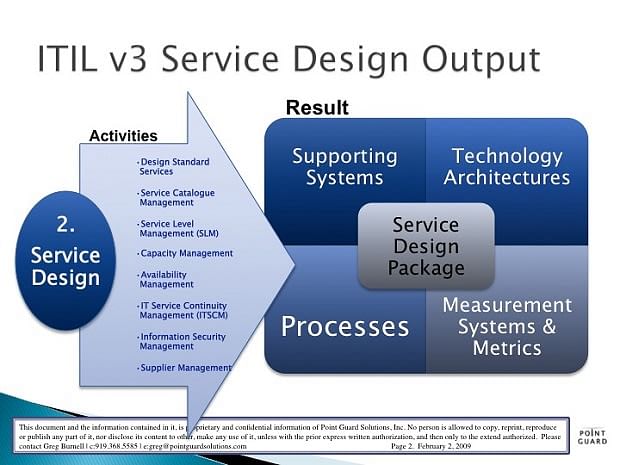
ITIL Service Design - An Ephemeral Overview and Concepts Involved

Skilling for the Digital Economy: A Role-Based Approach

ITIL Service Strategy - The First Stage of ITIL Service Lifecycle

5 Tips to Clear the ITIL 4 Exam



ITIL Service Design - An Ephemeral Overview and Concepts Involved
Skilling for the Digital Economy: A Role-Based Approach
ITIL Service Strategy - The First Stage of ITIL Service Lifecycle
5 Tips to Clear the ITIL 4 Exam
Learners Also Explore






Connect with our learning consultant to get all your questions answered about programs, faculty, and more
Key Things to Know
An IT Specialist installs, maintains, and troubleshoots the hardware, software, and network systems that support an organization. They resolve user issues, enforce security policies, and keep technology infrastructure running reliably across the business.